Forms of Measure
Skill Acquisition Target Forms of Measure
Each skill acquisition target is configured with a form of measure. A BCBA chooses the form of measure by assessing how to measure the effectiveness of the intervention in influencing behavior change.
Percent Correct
Behavior technicians can collect data on percent correct targets from the target list or the target card by selecting Yes/No based on the learner's response to intervention.
A percent score is calculated based on correct trials out of total trials.
If the minimum number of trials set in the target configuration is not collected, the score will not be plotted on the graph. An orange * will appear to indicate that the minimum trial criteria has not been met.
Prompting Workflows
Behavior technicians can collect data on percent correct targets with a prompting workflow from the target card.
Depending on the type of prompt fading, the behavior technician will either select from available prompt levels, or use the active prompt level for the target. The target card displays the prompt delay, prompt level name, and prompt description to help the behavior technician deliver the prompt properly.
If the learner responds correctly without prompts, the behavior technician can click "Independent". If the learner responds incorrectly or does not respond with prompts, the behavior technician can click "No".
Within Trials Prompt Fading: The behavior technician should support the learner with the prompt levels shown in the order they are shown, and click on the prompt level that is used to support a correct response.
- A score is calculated based on independent and prompted trials out of total trials. If a prompt level is not set to "score as correct", it will be considered as if it is an incorrect trial in the calculated score.
Across Session Prompt Fading: The behavior technician should support the learner with the active prompt level.
- The BCBA determines the prompt level order, and each level serves as the active prompt until the learner masters it.
- Once a prompt level is mastered, the graph will display a prompt change line indicating when the prompt level changed.
- Once all prompt levels set by the BCBA have been faded, only "Independent" and "No" will show during data collection.
- A percent score is calculated based on independent and prompted trials out of total trials.
If the minimum number of trials set in the target configuration is not collected, the score will not be plotted on the graph. An orange * will appear to indicate that the minimum trial criteria has not been met.
Tutorial: How to collect data on a target with a prompting workflow
Task Analysis
Behavior technicians can collect data on task analysis targets from the target card by selecting Yes/No based on the learner's demonstration of each step within a sequence of steps that constitutes a trial/skill.
A trial will be marked incomplete if data was not collected on all steps in the trial. Incomplete trials are not included in the score.
The score is calculated based on the average of all complete trials. Trial scores are calculated as a percent based on correct steps out of total steps.
If the minimum number of trials set in the target configuration is not collected, the score will not be plotted on the graph. An orange * will appear to indicate that the minimum trial criteria has not been met.
Task analysis steps are limited to 30 characters, allowing behavior technicians to quickly grasp the core focus of each step. Additional details can always be included in the target instructions.
Count
Behavior technicians can collect data on count (frequency) targets from the target list or the target card by selecting Add Count based on the learner's demonstration of the targeted skill.
If a targeted skill was not demonstrated, behavior technicians can score the target as a Zero on the target card.
Duration
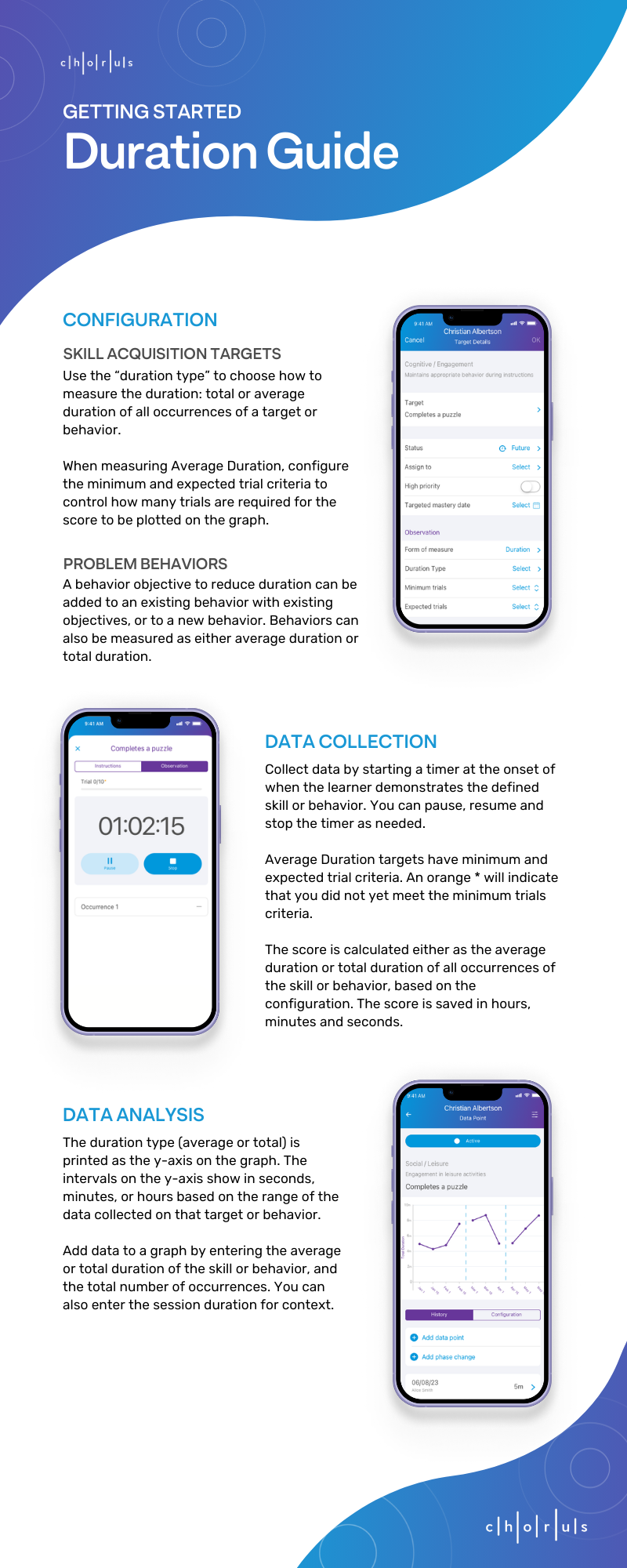
Behavior technicians can collect data duration targets by starting a timer at the onset of when the learner demonstrates the defined skill. You can pause, resume and stop the timer as necessary.
The score is either saved as the Average Duration of all occurrences of the target, or the Total Duration of all occurrences of the target, based on the duration type defined in the target configuration. A score is saved in hours, minutes, and seconds.
When the target is measured as Average Duration, there will be a minimum and expected trial criteria configured. If the minimum number of trials set in the target configuration is not collected, the score will not be plotted on the graph. An orange * will appear to indicate that the minimum trial criteria has not been met.
Behavior Reduction Forms of Measure
A behavior can have one or more behavior objectives (reduce frequency, reduce duration, reduce rate, etc.). The behavior objective displays under the behavior name on the target list.
Count
Behavior technicians can collect data on count behaviors from the target list or the target card by pressing Add Count based on the learner's behavior occurrences.
The score is saved as the total counts for that target.
Duration
Behavior technicians can collect data on duration behaviors by starting a timer when an occurrence of the behavior begins. You can pause the timer if you are unsure if the behavior occurrence has ended, and resume it if it continues, or stop the timer to finish that occurrence.
The score is either saved as the Average Duration of all occurrences of the behavior, or the Total Duration of all occurrences of the behavior, based on how the BCBA configured the behavior objective. A score is saved in hours, minutes, and seconds.
Rate
Session Duration as Observation Period
Collect data on rate behaviors where the rate is measured over the session duration by pressing Add Count based on the learner's behavior occurrences.
The score is saved as the total counts divided by the session duration.
The score is converted to per hour or per minute based on how the BCBA configured the mastery criteria.
- When 6 counts of a behavior are collected in a 45 minute session, and the mastery criteria is configured as per hour, the score will be saved as 8 per hour.
- When 35 counts of a behavior are collected in a 2 hour session, and the mastery criteria is configured as per minute, the score will be saved as 0.29 per minute.
Custom Observation Period
Collect data on rate behaviors where the rate is measured over a custom observation period (configured by the BCBA) by starting a timer to indicate the observation period has started. Press "Add Count" based on the learner's behavior occurrences. The timer will continue running until it reaches the observation period configured by the BCBA. You can also pause the timer or stop the timer early if the observation period is interrupted for any reason.
The score is saved as the total counts divided by the duration the timer was running. When multiple occurrences of the observation period are collected, the score is calculated as the average rate from all occurrences.
The score is converted to per hour or per minute based on how the BCBA configured the mastery criteria.
- When 5 counts of a behavior are collected in a 1.5 hour observation period, and the mastery criteria is configured as per hour, the score will be saved as 3.33 per hour.
- When 22 counts of a behavior are collected in a 10 minute observation period, and the mastery criteria is configured as per minute, the score will be saved as 2.2 per minute.
- When 22 counts of a behavior are collected in a 10 minute observation period, and 14 counts of the same behavior are collected in another 10 minute observation period, and the mastery criteria is configured as per minute, the score will be saved as the average of the rates: 1.8 per minute (average of 2.2 and 1.4).
User Guides
Duration
Rate
